Key notes
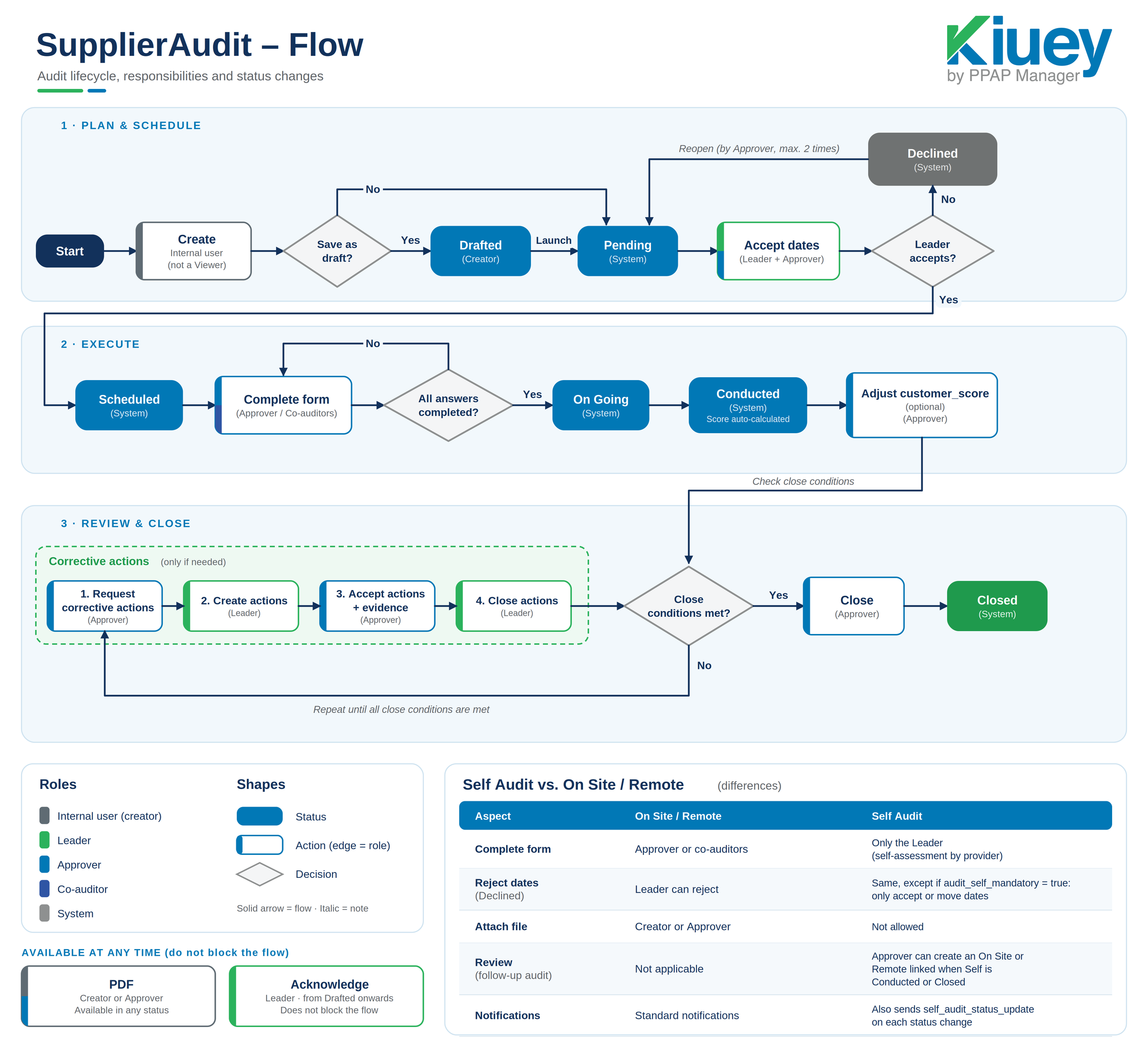
- Complete form: The Approver or co-auditors fill out the form.
- Score: Automatically calculated from the answers. The Approver can adjust the
customer_score(optional) only in Conducted. - Corrective actions: The Approver requests and accepts actions/evidence. The Leader creates and closes actions.
- Close conditions:
- No response marked as “requires action” can be left without an action.
- If corrective actions were requested, there must be at least one, and all must be accepted or closed.
- If corrective actions are requested and no actions are created, the audit cannot be closed.
- PDF: Can be generated by the creator or approver in any status. Recommended after score and actions.
- Acknowledge: The Leader can do it from the moment the audit is no longer Drafted. It does not block the flow.
Was this article helpful?
That’s Great!
Thank you for your feedback
Sorry! We couldn't be helpful
Thank you for your feedback
Feedback sent
We appreciate your effort and will try to fix the article