Archiving the APQP will stop all tasks.
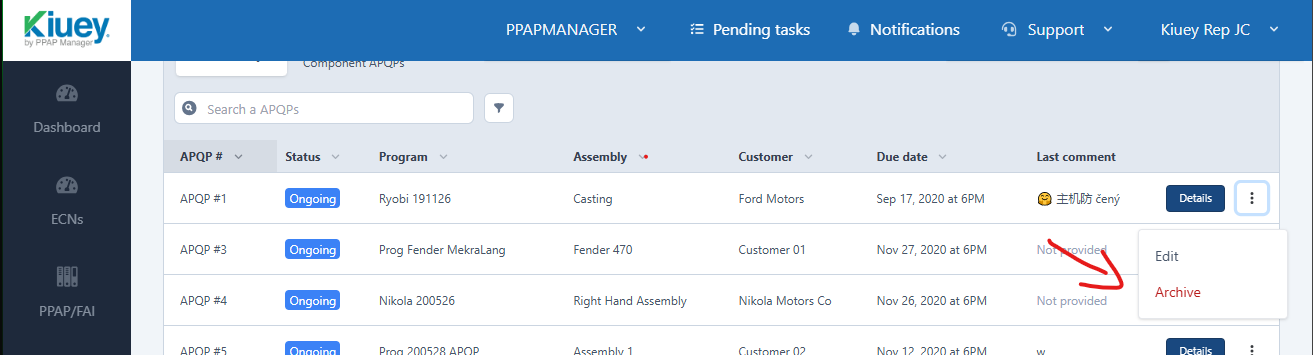
To do this, locate the APQP you'd like to archive, click the three dots on the right, then click on Archive.
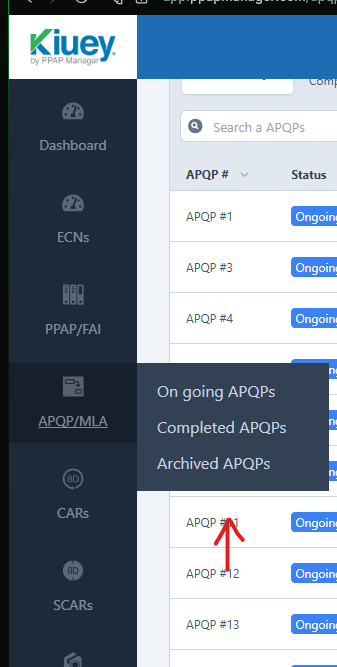
NOTE: Archived APQPs can be located on the sidebar menu.
NOTE 2: We recommend archiving the records to ensure they are retained and remain available for future reference. Deleting the records would mean they are no longer retained, and traceability will be lost; if any questions or concerns, please contact support via our support channels.
Was this article helpful?
That’s Great!
Thank you for your feedback
Sorry! We couldn't be helpful
Thank you for your feedback
Feedback sent
We appreciate your effort and will try to fix the article