The dashboard displays up to 16 PPAPs/APQPs (either assigned PPAPs/APQPs or all, depending on the user's role) that are either overdue or approaching their due date. Its purpose is to highlight the PPAPs that require immediate attention and action. To view the complete list of assigned PPAPs/APQPs, please navigate to the On-going list.
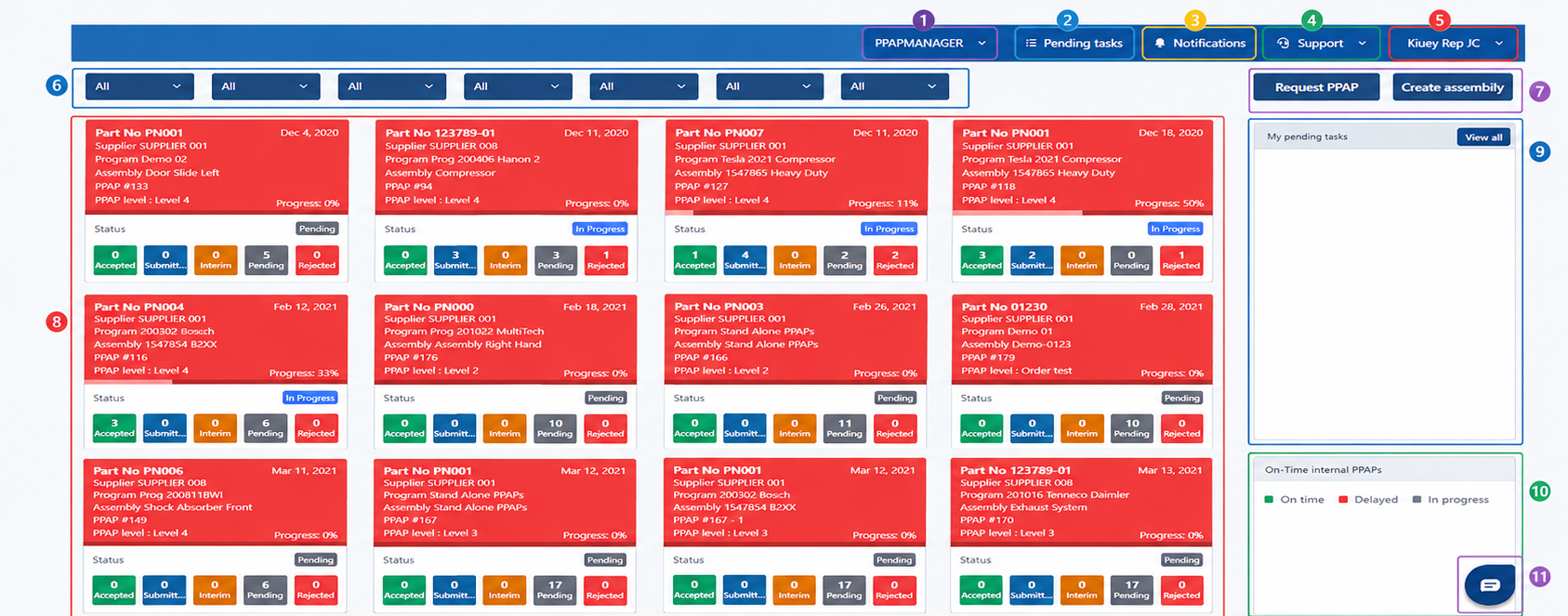
1) Navigation bar (PPAPMANAGER): Displays the application name. Click the dropdown to access other modules or sections available to you.
2) Pending tasks: Provides quick access to your pending tasks. Click to view and manage the tasks that require your attention.
3) Notifications: Click to view system notifications, updates, and alerts related to your PPAPs and tasks.
4) Support: Provides access to the help center and support resources, such as Contact Support or Help Articles. Use the dropdown for additional options.
5) User profile: Displays your user name. Click the dropdown to access your profile settings, preferences, or to log out.
6) Filters: Use these dropdowns to filter the PPAPs/APQPs by Part, Assembly, Program, Customer, Supplier, Approver, or Coordinator. The dashboard will update automatically based on the selected filters.
7) Actions (Request PPAP / Create assembly): Use these buttons to request a new PPAP or create a new assembly.
8) PPAP Cards: Displays the list of PPAPs/APQPs with key information such as Part Number, Supplier, Program, Assembly, PPAP/APQP number, level, date, and overall progress. Each card includes a status indicator and a summary of the stages: Accepted, Submitted, Interim, Pending, and Rejected.
9) My Pending Tasks: Shows the list of tasks that require your attention. Click "View all" to see all your pending tasks on a dedicated page.
10) On-Time PPAPs/APQPs : Graphical summary that shows the count of PPAPs/APQP by their delivery status: On time (green), Delayed (red), and In progress (gray).
11) Chat / Support: Click this button to open the chat/help center where you can get assistance.
Was this article helpful?
That’s Great!
Thank you for your feedback
Sorry! We couldn't be helpful
Thank you for your feedback
Feedback sent
We appreciate your effort and will try to fix the article